Paperless-ngx Alternative: Document Organization Without Docker
Looking for a Paperless-ngx alternative that skips Docker and self-hosting? Sortio organizes your documents with AI on your desktop — no server setup required.
Last updated 3/22/2026
Looking for a Paperless-ngx alternative that skips Docker and self-hosting? Sortio organizes your documents with AI on your desktop — no server setup required.
Paperless-ngx is an open-source document management system designed to turn physical documents into a searchable digital archive. It ingests scanned files, runs OCR to extract text, and lets you tag, search, and organize documents through a web interface. It grew out of the original Paperless project and has become the go-to recommendation in self-hosting communities for anyone who wants to go paperless at home or in a small office.
There is no question that Paperless-ngx is a capable tool. It handles OCR well, supports a wide range of file formats, and has an active community contributing improvements. But its architecture comes with a significant barrier to entry: it runs as a set of Docker containers backed by a PostgreSQL database, a Redis message broker, and a task queue. For people comfortable with Docker Compose files and Linux server administration, that is fine. For everyone else, it is a wall.
Docker is a powerful technology, but it was built for developers deploying services to servers — not for everyday users who want to organize the files already sitting on their computer. Setting up Paperless-ngx means installing Docker, writing or editing a `docker-compose.yml` file, configuring environment variables for the database and storage paths, mapping volumes so the container can access your documents, and then maintaining that stack over time. Updates require pulling new images, checking for breaking changes, and occasionally debugging container networking issues.
If something goes wrong — a failed migration, a corrupted database, a Redis connection timeout — you need to be comfortable reading container logs and troubleshooting at the infrastructure level. That is a reasonable expectation for a sysadmin running a home lab, but it is a steep ask for a freelancer who just wants their tax receipts sorted into folders.
Beyond the setup complexity, running Paperless-ngx means your documents live inside a system that is only accessible while the containers are running. If you stop the stack, you lose access to the web UI and search. Your files still exist on disk, but their organization lives in the database, not in a normal folder structure you can browse in Finder or Explorer.
How they differ in practice
Sortio takes a fundamentally different approach. It is a native desktop application for macOS that you download, install, and open — the same way you would install any other app. There is no Docker, no database to configure, no server to maintain. You are up and running in under a minute.
Instead of ingesting documents into a proprietary database, Sortio works directly with the files and folders already on your computer. You point it at a folder, describe how you want things organized — in plain language — and its AI engine sorts your files into a logical structure. The results are real folders on your filesystem. You can open them in Finder, sync them with iCloud or Dropbox, or back them up with Time Machine. Nothing is locked inside a container.
The AI layer is where Sortio separates itself from traditional file managers and rule-based organizers. Rather than requiring you to write regex patterns or define tagging taxonomies, you describe your intent naturally. Tell it to group client documents by project, separate invoices from contracts, or organize photos by event — Sortio interprets the instruction and builds the folder structure. It reads filenames, dates, and context to make intelligent decisions about where each file belongs.
| Consideration | Paperless-ngx | Sortio | |---|---|---| | Installation | Docker Compose + config files | Download and open the app | | Infrastructure | PostgreSQL, Redis, web server | None — runs natively on macOS | | File storage | Inside container volumes / database | Your normal filesystem | | Organization method | Manual tags and correspondents | AI-driven, plain-language rules | | Access to files | Web UI (requires running containers) | Finder, any app, always available | | OCR | Built-in via Tesseract | Not a focus — designed for file organization | | Updates | Pull new Docker images, check migrations | Standard app update | | Learning curve | Moderate to high | Minimal |
Paperless-ngx excels at one specific workflow: scanning physical paper, running OCR, and building a searchable archive. If that is your primary need and you are comfortable with Docker, it remains an excellent choice. But if your goal is organizing digital files that already exist on your computer — downloads, work documents, project assets, creative files — Sortio is built for exactly that task without requiring you to become a part-time systems administrator.
You might be looking for a Paperless-ngx alternative if any of the following sound familiar: you tried setting up Docker and gave up partway through; you got Paperless-ngx running but dread updating it; you want your files in normal folders rather than inside a database; or you simply want something that works immediately without a weekend of configuration.
Sortio is also worth considering if you are already organized but want to automate the maintenance. Setting up rules that keep folders tidy as new files arrive means you spend less time dragging things into the right place and more time on actual work.
What you gain by switching
Paperless-ngx is an open-source document management system designed to turn physical documents into a searchable digital archive.
It ingests scanned files, runs OCR to extract text, and lets you tag, search, and organize documents through a web interface.
It grew out of the original Paperless project and has become the go-to recommendation in self-hosting communities for anyone who wants to go paperless at home or in a small office.
How to make the switch
Sortio takes a fundamentally different approach.
It is a native desktop application for macOS that you download, install, and open — the same way you would install any other app.
There is no Docker, no database to configure, no server to maintain.
Trade-offs to know about
Finding the right organizational approach for specific needs Start with a simple structure and iterate based on actual usage patterns.
Maintaining organization over time as files accumulate Use AI-powered tools like Sortio to automate ongoing file sorting and categorization.
Dealing with inconsistent file naming and formats Leverage content-aware sorting that analyzes file contents rather than relying solely on filenames.
Tested November 20, 2026 on Sortio 9.0.0
We ran Sortio on 110 test files
Test folder. Every file, company and person here is made up.
The folder
Three years of household paperwork, the kind people feed to Paperless-ngx: bank statements, utility bills, insurance, medical statements, tax forms, pay stubs and vehicle registrations, all named like scanner output (scan0042.pdf, Scan_20261108_0113.pdf) and all dated the same scanning day.
110 PDF files
The request
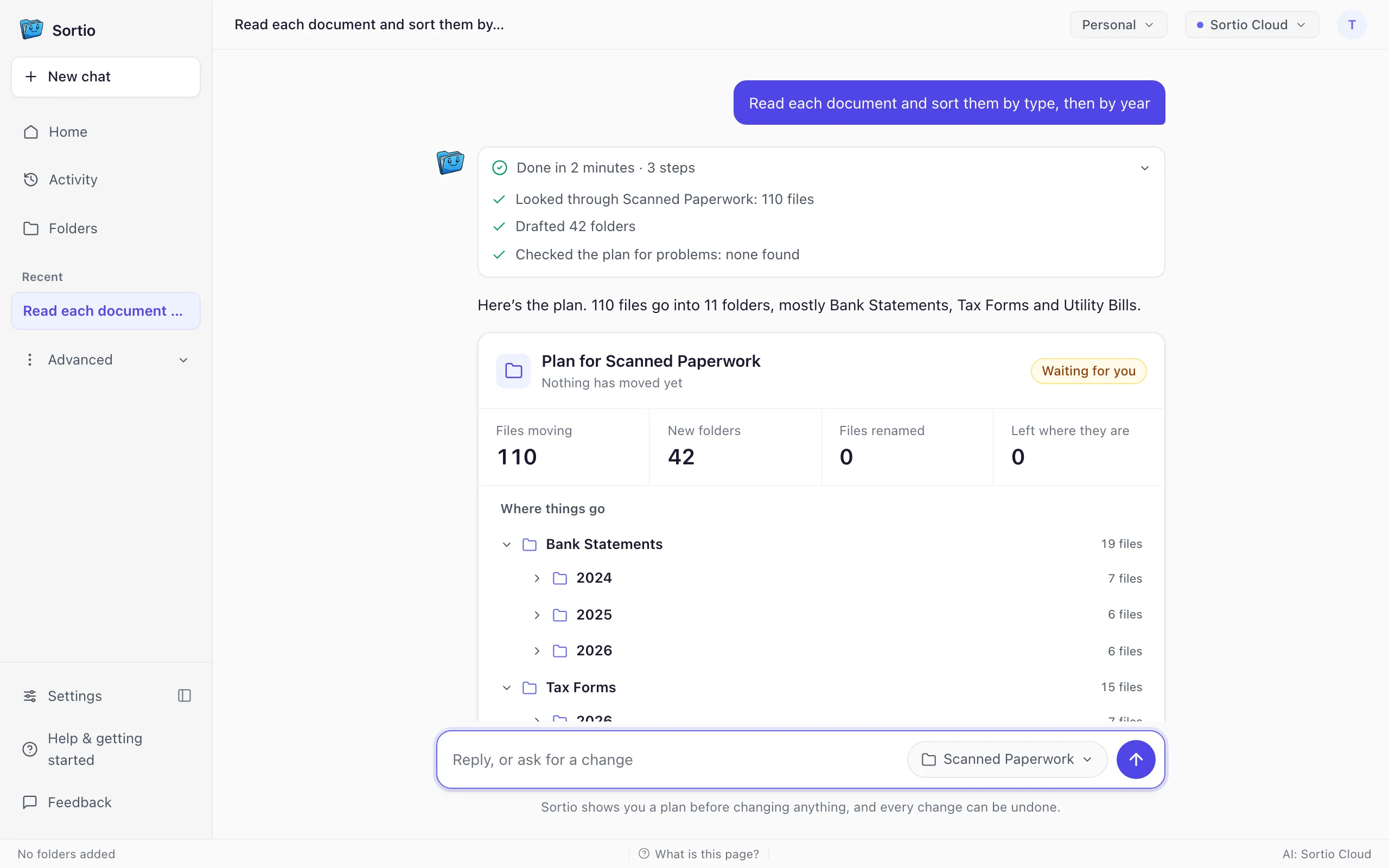
Read each document and sort them by type, then by year
The result
in the right folder
- Right folder91
- Wrong folder17
- Not filed (left where they were or put in Uncategorized)2
- Time to plan
- 124 s
- Folders
- 42
- Files read
- 110 of 110
Good fit if your household paperwork has scanner-style names: Sortio read every document and sorted bank, insurance and medical papers by what they contain.
Watch for the 2026 folders: some pay stubs and utility bills landed there because Sortio used the file's created date, not the document's own date.
What we found
Some years came from the scan date, not the document
Several of Sortio's reasons cite the file's created date, such as "created in 2026." All 110 scans shared the same scanning day, so pay stubs, utility bills and a vehicle registration from 2024 and 2025 were filed under 2026.
Document type came from contents, not file names
Sortio read all 110 files even though their names carried no clues. Its Bank Statements, Insurance Policy Declarations and Medical Bill Statements folders held only correct files in every year.
Pay stubs were split up and pulled into 2026
Stubs ended up in both Pay Statements and Earnings Statements, and a stub went to Receipts as a "Receipt associated with Larkspur Design Group LLC." Every listed pay stub miss landed in a 2026 folder.
Strict category matching sent 2 files to Uncategorized
A property tax statement went to Uncategorized as "not one of the allowed categories," and so did a Crestline Fiber Internet invoice, even though the plan had Tax Forms and Utility Bills folders.
What it got wrong
19 of 110 filesEvery file, company and person here is made up.
- file_63843.pdfand 1 more like it
- Went to
- Pay Statements / 2026
- Belonged in
- Pay stubs / 2024
Sortio's reason: Pay statement for Lucia Haddad; created in 2026.
- scan0717.pdf
- Went to
- Uncategorized / 2026
- Belonged in
- Utility bills / 2024
Sortio's reason: Invoice from Crestline Fiber Internet; no matching allowed folder besides uncategorized.
- doc88812.pdf
- Went to
- Utility Bills / 2026
- Belonged in
- Utility bills / 2025
Sortio's reason: Utility bill for the Greyford address; created in 2026.
Show 9 moreShow fewer
- IMG_3780.pdf
- Went to
- Utility Bills / 2026
- Belonged in
- Utility bills / 2025
Sortio's reason: Utility bill for the Greyford address; year inferred from created date 2026.
- IMG_8605.pdf
- Went to
- Receipts / 2025
- Belonged in
- Utility bills / 2025
Sortio's reason: Receipt dated July 19, 2025.
- Untitled-8.pdf
- Went to
- Uncategorized / 2024
- Belonged in
- Taxes / 2024
Sortio's reason: Property tax statement is not one of the allowed categories, so it goes to Uncategorized.
- Untitled-11.pdf
- Went to
- Pay Statements / 2026
- Belonged in
- Pay stubs / 2024
Sortio's reason: Earnings statement for Lucia Haddad from Larkspur Design Group LLC; filing under pay statements for 2026.
- doc8459.pdf
- Went to
- Pay Statements / 2026
- Belonged in
- Pay stubs / 2025
Sortio's reason: Earnings statement for Lucia Haddad from Larkspur Design Group LLC.
- file_35136.pdf
- Went to
- Earnings Statements / 2026
- Belonged in
- Pay stubs / 2025
Sortio's reason: Earnings statement for Lucia Haddad; created in 2026.
- IMG_3314.pdf
- Went to
- Receipts / 2026
- Belonged in
- Pay stubs / 2025
Sortio's reason: Receipt associated with Larkspur Design Group LLC.
- attachment-91332.pdf
- Went to
- Pay Statements / 2026
- Belonged in
- Pay stubs / 2025
Sortio's reason: Pay stub for Lucia Haddad; created in 2026.
- Untitled-37.pdf
- Went to
- Vehicle Registration Renewals / 2026
- Belonged in
- Vehicle / 2024
Sortio's reason: Vehicle registration renewal from DMV; created in 2026.
6 more like these in the full results file below.
All 42 folders Sortio made
- Every file right
- Has wrong files
- Catch-all (counts as not filed)
Bank Statements
- 20247
- 20256
- 20266
Earnings Statements
- 20241
- 20251
- 20263 of 4 right
Insurance Policy Declarations
- 20244
- 20254
- 20264
Medical Bill Explanations
- 20242
- 20253
- 20261
Medical Bill Statements
- 20244
- 20253
- 20265
Pay Statements
- 20242
- 20251
- 20263 of 8 right
Receipts
- 20241
- 20251 of 3 right
- 20262 of 3 right
Tax Forms
- 20243
- 20254 of 5 right
- 20264 of 7 right
Uncategorized
- 20241
- 20261
Utility Bills
- 20244
- 20253
- 20266 of 8 right
Vehicle Registration Renewals
- 20241
- 20262 of 4 right
How we scored it
- Before the sort we wrote down where every file belonged. Sortio never saw that answer key.
- Sortio names its own folders, so for document type we graded the grouping, not the names: a file is right when most files in its folder are the same document type as it.
- For year, the folder also has to be named for the file's own year.
- Files left where they were, or put in a catch-all folder like Uncategorized, count as wrong.
- Sortio read the contents of 110 files.
- 11 of the 21 groups in the answer key were split across more than one folder (for example Utility bills / 2024 went to Receipts / 2024 and Utility Bills / 2024). A split still counts as right when each folder holds only that kind of file.
Limits of this test
- Every document is invented, so this shows how Sortio files paperwork, not how it does on yours.
- The documents are PDFs with a text layer. Real paper scans would go through on-device OCR first, which this test did not exercise.
- Sortio files documents into folders. It does not keep a searchable archive with tags and correspondents the way Paperless-ngx does.
Frequently asked questions
Can Sortio handle the same volume of documents as Paperless-ngx?
Sortio is designed to handle large collections of files efficiently. Its AI sorting engine processes files in batches and can work through folders containing thousands of items. Because it operates directly on your filesystem rather than importing documents into a database, there is no ingestion bottleneck. The practical limit is your disk space and filesystem, not the application itself.
Does Sortio offer OCR or full-text search like Paperless-ngx?
Sortio is focused on intelligent file organization rather than OCR and full-text search. It reads filenames, metadata, and folder context to sort files, but it does not extract text from scanned PDFs the way Paperless-ngx does. If OCR is essential to your workflow, you can run a dedicated OCR tool on your documents first and then use Sortio to organize the results. macOS also provides built-in search through Spotlight, which indexes the contents of many file types automatically.
Is Sortio free, or does it require a subscription?
Sortio offers a free trial so you can test it with your own files before committing. After the trial, rule-based sorting stays free and unlimited, and the Pro plan is available at $14.99/month or $99/year for users who need advanced capabilities. Either way, there are no separate infrastructure costs to run it.
Try Sortio for free
The free tier includes a one-time AI trial allowance and rule-based sorting up to five rules. Enough to test on a real folder before deciding anything.
Download Sortio